
Step 1: Visit umr.com – login as a “MEMBER”


Step 2: From the UMR member home page, find the “Health Center” on the blue bar that the top of the screen.
Step 3: Hover over the “Health Center” and a drop down menu will appear.
On this menu, click on the “Live Well Reward$”

Step 4: Click on the “Get Started” button, shown below with a red arrow.

Step 5: A new screen will open.
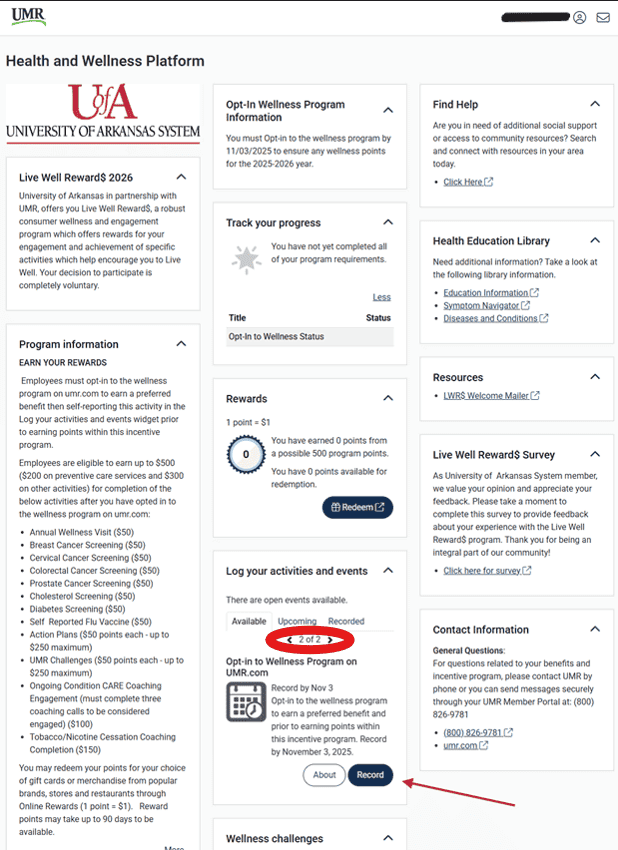
In the “Track Your Progress” block, you will see a grey star and a statement about not being opted-in yet.
Step 6: Scroll down to the “Log your activities and events” section an scroll to the second activity on the available activities and events for the “Opt-In to the Wellness Program on UMR.com”. You will then click “Record” on that section.
Step 7: Select today’s date on the calendar icon next to “Completed”. Then check the box stating, “I have completed the event requirements.” and then click “Record”. Once complete, refresh the webpage.

Step 8: After refreshing the page, you should now see a blue highlighted star and a statement that reads, “Congratulations! You have met all your program requirements.”
This means you are opted-in and can begin to use the action plans and complete other challenges on this page for the 2026-2027 program. Remember, all eligible events that require insurance will be reported if qualified to the wellness portal via UMR claims data.

Looking for Help?
Log in to umr.com and select Health center from the main menu and choose Wellness activity center.
Click the Get started button then go to Contact information or call:
800-207-7680.
If you need assistance registering with your HealthSafe ID or are having any other technical issues, please call 866-922-8266.
If you think that you might not be able to meet the standard for a reward under this program, you might qualify for an opportunity to earn the same reward by different means. Contact us and we will work with you to establish an alternative goal with the same reward.